
Mysql Date Comparison


Mysql Date Comparison is used to return the date from a table on the basis of comparison between any two values of dates.
Understand with Example
The Tutorial illustrate an example from 'Mysql Date Comparison'. To understand this example we create a table 'Employee1' in the database.
Step1:-Create table name EMPLOYEE1 in the database:-
Query:-
| CREATE TABLE EMPLOYEE1 ( ID int(2) NOT NULL auto_increment, EMPNAME varchar(30), ATTENDENCE varchar(10), DAT date NOT NULL default '0000-00-00', PRIMARY KEY (ID) ) ; |
Output:-
 |
Step2:-Insert the values in the table by giving the query given below:-
Query:-
| INSERT into EMPLOYEE1 VALUES
('01','Girish','P','2008-12-01'), ('02','Komal','A','2008-12-02'), ('03','Mahendra','P','2008-12-03'), ('04','Sandeep','A','2008-12-04'), ('05','Amit','P','2008-12-05'); |
Output:-
 |
Step3:-Write the query given below for comparing the given two dates:-
Query:-
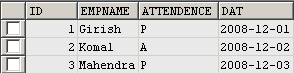
The Query below return you the set of records from 'Employee1' whose value of date is greater than equal to '2008-12-01' and less than equal to '2008-12-03'.
| SELECT * FROM EMPLOYEE1 WHERE DAT >='2008-12-01' AND DAT <='2008-12-03'; |
Output:-
 |
