
MySQL Convert


This section describes about the MySQL convert. It provides a way for converting the data of one type to another type.
Syntax:
| CONVERT(expr,type) |
The "type" can have the following values:
|
For example, BINARY converts a string to BINARY data type.
Table: employee
| CREATE TABLE `employee` ( `emp_id` int(11) NOT NULL auto_increment, `emp_name` varchar(100) character set utf8 NOT NULL, `emp_salary` int(11) NOT NULL, `emp_startDate` datetime NOT NULL, `dep_name` varchar(50) NOT NULL, PRIMARY KEY (`emp_id`) ) |
Data in the above table: (Using SELECT * FROM employee;)
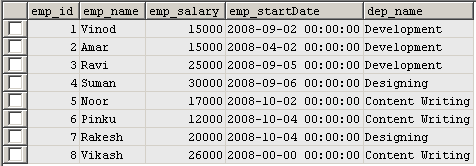
In the following query we will use MySQL convert() function.
| SELECT CONVERT(emp_id,CHAR) AS Character_Emp_Id, CONVERT(emp_startDate,Date) AS Character_emp_Salary FROM employee; |
Output:

