
How to design a question message symbol
Let's see how to make a question message symbol, you can make it by this example.
Draw a circle: Choose "4f65ef" color and Ellipse tool (U key) to draw a circle shape.

Effect: Go to Layer menu > Layer style > Bevel and Emboss.

Your will get it.

Inset symbol: Choose Horizontal type tool (T key) and make formatting then type question mark by your keyboard.


Effect: Go to Layer menu > Layer style > Inner Shadow.
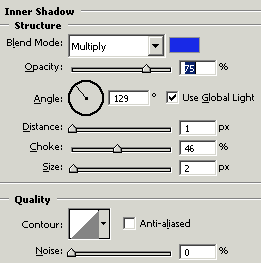
This is your done.

