How to make a burning man


This is a burning man effect, it has been made by some effective steps that are given in this example.
Fire picture: Start this example by taking a fire picture.
]
Blur effect: Go to Filter menu > Blur > Gaussian blur.

You will get it.

Selection: Make selection like a running man shape by the Polygonal lasso tool (L key).

Paste into: Make copy any fire picture to paste in the man shape selection, go to Edit menu > Paste into (Ctrl + Shift + V).
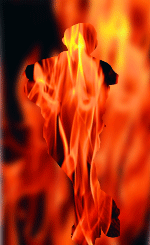
This is your final result.
