Home | Ajax | BioInformatics | Dojo | EAI | EJB | Hibernate | J2ME | Java | Java Glossary | Java Servlets | JavaScript | Jboss | JDBC | JDO | Jmeter | JSF | JSP | JUnit | Maven | MySQL | Spring Framework | SQL | Struts | Technology | WAP | Web Services | XML

Search:
   Programming Tutorials: Ajax | Articles | JSP | Bioinformatics | Database | Free Books | Hibernate | J2EE | J2ME | Java | JavaScript | JDBC | JMS | Linux | MS Technology | PHP | RMI | Web-Services | Servlets | Struts | UML Facing Programming Problem? Ask Questions?, Browse Latest Questions, Question-Answer Guidelines
MySQL
  JDO Tutorials
  EAI Articles
  Struts Tutorials
  Java Tutorials
  Java Certification
  Java Applet
Questions
Comments
Validating User in JSP
In this example we have to develop a JSP application which will validate user via servlet and JSP page. We are using tomcat server for running servlet.


Validating User in JSP


Example program for validating user in JSP

In this example we have to develop a JSP application which will validate user via servlet and JSP page. We are using tomcat server for running servlet.

Validating user means to find out whether the user is an existing user. We are using two files UserValidation.jsp and Validation.java and making the application in "webapps/JSPMultipleForms" in tomcat server. UserValidation.jsp is taking input through the user and then after taking these input it will send these values to servlet where all these inputted values are checked from the data available in database. For database connection we are taking MySQL as backing database and servlet "Validation.java" is responsible for making database connection and validating input.

In this example, we are taking the MySQL database for adding values into database and this whole application is being deployed in "Tomcat web server". In our example we have taken path "//192.168.10.59/messagepaging" for connection to the database. Table for adding data is named as "User" and input values are user and password.

User Table Structure of MySQL:

create table `user` (
`user` varchar (256),
`password` varchar (256)
); 
insert into `user` (`user`, `password`) values('amit','kumar');

Code for validating servlet is given as below:

1. Validation.java

import java.io.*;
import java.util.*;
import java.sql.*;
import javax.servlet.*;
import javax.servlet.http.*;

public class Validation extends HttpServlet{

  private ServletConfig config;
  
  public void init(ServletConfig config)
    throws ServletException{
     this.config=config;
     }
  public void doPost(HttpServletRequest request, HttpServletResponse response
              throws 
ServletException,IOException{
      
    PrintWriter out = response.getWriter();
    String connectionURL = "jdbc:mysql://192.168.10.59/messagepaging";
    Connection connection=null;
    ResultSet rs;
    String userName=new String("");
    String passwrd=new String("");
    response.setContentType("text/html");
    try {
       // Load the database driver
      Class.forName("com.mysql.jdbc.Driver");
      // Get a Connection to the database
      connection = DriverManager.getConnection(connectionURL, "root""root")
      //Add the data into the database
      String sql = "select user,password from User";
      Statement s = connection.createStatement();
      s.executeQuery (sql);
      rs = s.getResultSet();
      while (rs.next ()){
        userName=rs.getString("user");
        passwrd=rs.getString("password");
      }
      rs.close ();
      s.close ();
      }catch(Exception e){
      System.out.println("Exception is ;"+e);
      }
      if(userName.equals(request.getParameter("user")) 
          && passwrd.equals
(request.getParameter("pass"))){
        out.println("User is Valid");
      }
      else{
        out.println("You are not a Valid User");
      }
  }
}  

"Validation.java" will firstly load the driver. Here for MySQL  "Class.forName("com.mysql.jdbc.Driver");" will do the working for us.
After loading appropriate driver servlet is making connection with database and we have stored these values from database into temporary variables.
These temporary variables are responsible for validating user input. Code for "UserValidation.jsp":

2. UserValidation.jsp

<%@ page language="java" %>
<h2><font color="#0000FF"><b>Validation&nbsp;</b></font>
<br>
<br>
Please enter username and password</h2>
<form name="frm" action="/JSPMultipleForms/Validation" method="Post" >
<b>
Name:&nbsp;</b>&nbsp;&nbsp; &nbsp;&nbsp;<input type="text" name="user" value=""/><br>
<b>
Password:</b><input type="password" name="pass" value=""/>
&nbsp;
<p>&nbsp;&nbsp;&nbsp;&nbsp;&nbsp;&nbsp;&nbsp;
&nbsp;&nbsp;&nbsp;&nbsp;&nbsp;&nbsp;&nbsp;&nbsp;&nbsp;&nbsp;&nbsp;
&nbsp;<input type="submit" value="Check" />
</p>
</form>

For running and executing servlet we have to do the Servlet-mapping in the "web.xml". Code for validating servlet "web.xml" is given as below:

<?xml version="1.0" encoding="ISO-8859-1"?>

<web-app xmlns="http://java.sun.com/xml/ns/j2ee"
xmlns:xsi="http://www.w3.org/2001/XMLSchema-instance"
xsi:schemaLocation="http://java.sun.com/xml/ns/j2ee http://java.sun.com/xml/ns/j2ee/web-app_2_4.xsd"
version="2.4">

<display-name>Welcome to Tomcat</display-name>
<description>
Welcome to Tomcat
</description>

<!-- JSPC servlet mappings start -->


<servlet>
<servlet-name>Validation</servlet-name>
<servlet-class>Validation</servlet-class>
</servlet>

<servlet-mapping>
<servlet-name>Validation</servlet-name>
<url-pattern>/Validation</url-pattern>
</servlet-mapping>

<!-- JSPC servlet mappings end -->

</web-app>

For running this example you have to follow these steps:

1.Create and Save "Validation.java".
2.Compile this java file and place the Validation.class file into classes folder.
3.Do the servlet mapping in the web.xml
4.Create and Save "UserValidation.jsp" and place it into appropriate folder.
5.Start the Tomcat Server.
6.Type following line in address bar http://localhost:8080/JSPMultipleForms/UserValidation.jsp.

Output:

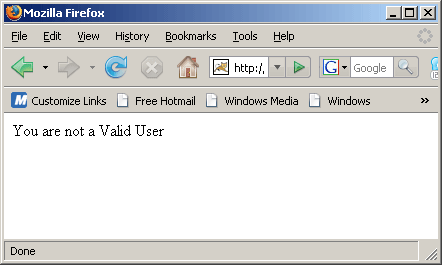
If wrong input is given then message will flash "You are not a valid user".

Download SourceCode


Leave your comment:

Name:

Email:

URL:

Title:

Comments:


Enter Code:

Audio Version
Reload Image
 

Note: Emails will not be visible or used in any way, and are not required. Please keep comments relevant. Any content deemed inappropriate or offensive may be edited and/or deleted.

No HTML code is allowed. Line breaks will be converted automatically. URLs will be auto-linked. Please use BBCode to format your text.

Add This Tutorial To:
  Del.icio.us   Digg   Google   Spurl   Blink   Furl   Simpy   Y! MyWeb 

Current Comments

1 comments so far (
post your own) View All Comments Latest 10 Comments:

sir,
i am mahendra from New Delhi from India,
i am very confused for struts validation program.
please give me a simple logic for struts validation (struts 1)

Posted by mahendra on Thursday, 11.13.08 @ 05:53am | #81638

Latest Tutorials:
J2ME Event Handling Ex
J2ME HashTable Example
J2ME Icon MIDlet Examp
J2ME Image Item Exampl
J2ME Image Example
J2ME Item State Listen
J2ME Key Codes Example
J2ME KeyEvent Example
J2ME Label Example
J2ME Random Number
J2ME Read File
J2ME RMS Sorting Examp
J2ME Timer MIDlet Exam
Custom Item in J2ME
Creational Design Patt
Design Patterns
Throwing Run time exce
Grid in Echo3
Creating Table in Echo
JPA Introduction
Java bigdecimal toBigI
Java bigdecimal shortV
Java bigdecimal signum
Java bigdecimal stripT
Java bigdecimal subtra
Java bigdecimal toBigI
Java bigdecimal toEngi
Java bigdecimal toPlai
Java bigdecimal toStri
Java bigdecimal ulp ex
Java bigdecimal unscal
Java bigdecimal valueO
Java bigdecimal setSca
Java bigdecimal scaleB
Java bigdecimal scale
Java bigdecimal round
Java bigdecimal remain
Java bigdecimal precis
Java bigdecimal pow me
Java bigdecimal pow ex
Java bigdecimal plus m
Java bigdecimal plus e
Java bigdecimal negate
Java bigdecimal multip
Java BigDecimal movePo
Java bigdecimal movePo
Java bigdecimal min ex
Java bigdecimal max ex
CheckBox component in
Visibility of Componen
Loading delay componen
Simple input applicati
Opening a new window i
Hello World in Echo3 f
Use of Local Inner cla
JSP bean set property
Java Method Synchroniz
Java Method Return Val
JAVA Method Wait
JDBC vs ORM
Java BigDecimal divide
Java BigDecimal double
Java BigDecimal equals
Java BigDecimal hashCo
Java BigDecimal intVal
Java BigDecimal longVa
Java BigDecimal abs ex
Java BigDecimal add ex
Java BigDecimal byteVa
Java Bigdecimal class
Java BigInteger long
Java BigDecimal compar
Java divide method exa
Java BigDecimal floatV
Appending Image into t
J2ME Convert Date To S
Appending string in J2
J2ME Enumeration Examp
J2ME Display Size Exam
J2ME Current Date And
J2ME Form Class
Creating Dynamic Tree
Introduction to RCFace
JSP bean get property
Java bean example in J
J2ME Record Store Exam
Java String toLowerCase Example
Java String toCharArray Example
Java String substring Example
Java String indexOf Example
Java String startsWith Example
Java String hashCode Example
Java String matches Example
Java String length Example
Java String lastIndexOf Example
Java String isEmpty Example
Java String equalsIgnoreCase Example
Java String equals Example
Java String endsWith Example
Java String copyValueOf Example
Java String contentEquals Example
  EAI Articles
  Java Certification
Tell A Friend
Your Friend Name
Search Tutorials


Browse all Java Tutorials
Java JSP Struts Servlets Hibernate XML
Ajax JDBC EJB MySQL JavaScript JSF
Maven2 Tutorial JEE5 Tutorial Java Threading Tutorial Photoshop Tutorials Linux Technology
Technology Revolutions Eclipse Spring Tutorial Bioinformatics Tutorials Tools SQL
 

Home | JSP | EJB | JDBC | Java Servlets | WAP  | Free JSP Hosting  | Search Engine | News Archive | Jboss 3.0 tutorial | Free Linux CD's | Forum | Blogs

About Us | Advertising On RoseIndia.net  | Site Map

India News

Indian Software Development Company | iPhone Development Company in India | Java Training Delhi | Java Training at Noida |

Send your comments, Suggestions or Queries regarding this site at roseindia_net@yahoo.com.

Copyright © 2008. All rights reserved.