Core Java| JSP| Servlets| XML| EJB| JEE5| Web Services| J2ME| Glossary| Questions? | Software Development
 

Retrieve HTTP Request Headers using JSP

When a HTTP client sends a request, it is required to supply GET or POST. It can send a number of headers.

Retrieve HTTP Request Headers using JSP


This section illustrates you how to retrieve the request headers.

When a HTTP client sends a request, it is required to supply GET or POST. It can send a number of headers. Here are some headers:


Accept - MIME type, the browser prefers.
Accept-Charset - The Character set the browser expects.
Accept-Language - The language which the browser is accepting.
Connection - If a servlet gets a keep-Alive value or gets a 
request line indicating HTTP 1.1, it may be able to take advantage of connection.
Host (host and port as defined in url).
Content-Length (for POST messages).
User-Agent (type of browser, if servlet is returning browser-specific content).

We are providing you an example which explains you clearly.

Here is the code of headers.jsp

<%@ page import="java.util.*" %>
<html>
<head>
<title>Http Request Headers Example</title>
</head>
<body>
<h2>HTTP Request Headers Received</h2>
<table>
<%
Enumeration enumeration = request.getHeaderNames();
while (enumeration.hasMoreElements()) {
String name = (String) enumeration.nextElement();
String value = request.getHeader(name);
%>
<tr><td><%= name %></td><td><%= value %></td></tr>
<%
}
%>
</table>
</body>
</html>

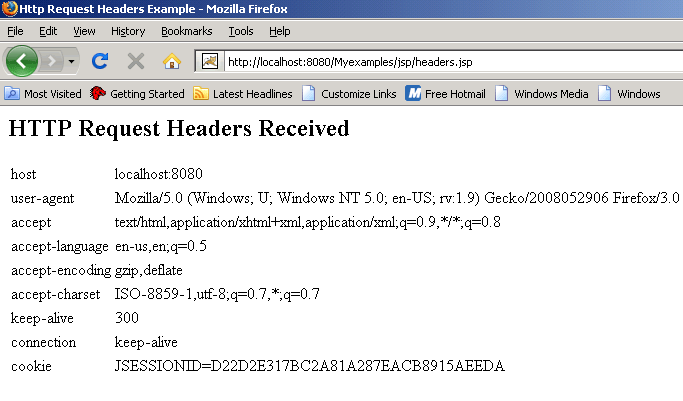
In the above example, we have created an object of class Enumeration by calling the method getHeaderNames() of the request object. This method provides the different header names and their information.

Output will be displayed as
Download Source Code


» View all related tutorials
Related Tags: java html c web jsp dynamic static script servlet sed ip page tag this log tar close js start technology

Leave your comment:

Name:

Email:

URL:

Title:

Comments:


Enter Code:

Audio Version
Reload Image
 

Note: Emails will not be visible or used in any way, and are not required. Please keep comments relevant. Any content deemed inappropriate or offensive may be edited and/or deleted.

No HTML code is allowed. Line breaks will be converted automatically. URLs will be auto-linked. Please use BBCode to format your text.

Add This Tutorial To:
  Del.icio.us   Digg   Google   Spurl   Blink   Furl   Simpy   Y! MyWeb 
 
Tell A Friend
Your Friend Name


Recently Viewed
Software Solutions
Search Tutorials


Home | JSP | EJB | JDBC | Java Servlets | WAP  | Free JSP Hosting  | Search Engine | News Archive | Jboss 3.0 tutorial | Free Linux CD's | Forum | Blogs

About Us | Advertising On RoseIndia.net  | Site Map

India News

Send your comments, Suggestions or Queries regarding this site at roseindia_net@yahoo.com.

Copyright © 2008. All rights reserved.