How to Create JSP Page


In this section we will show you how you can create JSP page and then test on tomcat server. Creating a new JSP page is very simple and any text editor can be used.
In this example I will show you how to create a simple JSP page that prints current date and time on the browser.
Java date class is used to get the current date and then print on the web browser.
Steps to Create JSP page:
Step 1:
Open note page and then paste the following in the note pad.
| <%@page
contentType="text/html" import="java.util.*" %>
<!-- http://www.roseindia.net/jsp --> <html> <tr> </tr>
|
Step 2:
Save the file and enter the file name "date.jsp" and click on the "Save" button.
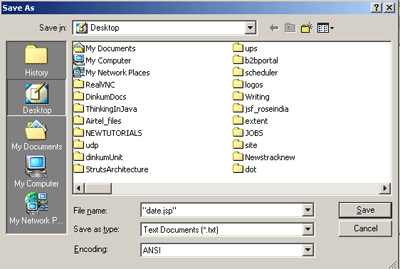
Note that the file name is enclosed in double quotes "date.jsp".
Step 3:
Now deploy the application and test it. If you don't have any experience in tomcat, learn it at our Tomcat Tutorial page.
