
Insert data in Excel File from Database using JSP


In this section, we have developed a application to insert data in excel file from database in JSP. We created file SearchUser.jsp, excelData.jsp.
Brief description of the flow of the application:
- User opens SearchUser.jsp on the browser and enter the data to be search and click on the "Search" button.
- After click "Search button, application will retrieve the data from database, create an excel file and data insert into newly generated excel file.
- Steps to create an excel file :
- Download the POI.jar from Apache Jakarta Project .
- Extract it and then copy poi-2.5.1-final-20040804.jar, poi-contrib-2.5.1-final-20040804.jar and poi-scratchpad-2.5.1-final-20040804.jar into C:\apache-tomcat-5.5.23\common\lib directory .
- Then download source code and paste into C:\apache-tomcat-5.5.23\webapps\excel.
- Start the web server.
- Create folder into C drive with the name 'excel' .
- The excel file will generate into directory C:\excel.
- After create an excel file open it and view the search data in the excel file.
Step 1: Create a web page ("SearchUser.jsp") to SearchForm.
| <html> <head> </head> <body> <br><br><br><br> <form name="searchForm" method="post" action="excelData.jsp"> <table align="center" bgcolor="LIGHTBLUE"> <tr> <td colspan=3 align="center"><b> <span style="font-size:20px;">Create a Excel file with Search Table</span></b></td> </tr> <tr> <td colspan=3> </td> </tr> <tr> <td><b>Search</b></td> <td><input type="text" name="searchtxt" value=""></td> <td><input type="submit" name="Submit" value="Search"></td> </tr> <tr> <td colspan=3> </td> </tr> </table> </form> </body> </html> |
Step 3:Create a webpage "excelData.jsp" to retrieve the data from database and create excel file and insert the data into excel file.
<%@ page import="org.apache.poi.hssf.usermodel.HSSFSheet"%>
|
Successful Output of the program:

To click on "Search" Button to Search data
and insert this data into excel file.
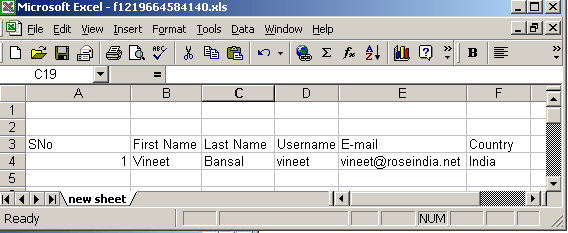
The Output is Display on the Browser :

Download the full web application shows here.
