Core Java| JSP| Servlets| XML| EJB| JEE5| Web Services| J2ME| Glossary| Questions?


Search Tutorials:
 

Software Solutions and Services


  JDO Tutorials
  EAI Articles
  Struts Tutorials
  Java Tutorials
  Java Certification
  Java Applet
Questions
Comments
 
The isErrorPage Attribute of page Directive In JSP 
 

This section provides the best illustration of the isErrorPage attribute of the page directive in JSP by providing three JSP pages and it's output.


The isErrorPage Attribute of page Directive In JSP


This section provides the best illustration of the isErrorPage attribute of the page directive in JSP by providing three JSP pages and it's output. This is a boolean attribute of the page directive. It sets the boolean value either true or false. You can use the exception object in the JSP page if you set the true value of the attribute otherwise you cannot use the exception object because the default value of the attribute is false.

Here, this section provides the two JSP files these are:

  • ErrorPageAttribute.jsp
  • error.jsp

About the ErrorPageAttribute.jsp page:

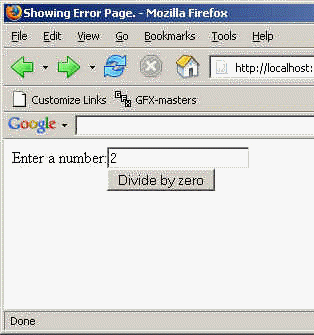
This page show a simple text box in which you have to enter a number and a button which is used for submission the html form and divided the entered number by 0 (Zero) i.e. the cause of generating an error and the page is redirected to the specified file name which is mentioned as the value of the errorPage attribute of the page directive.

About the error.jsp page:

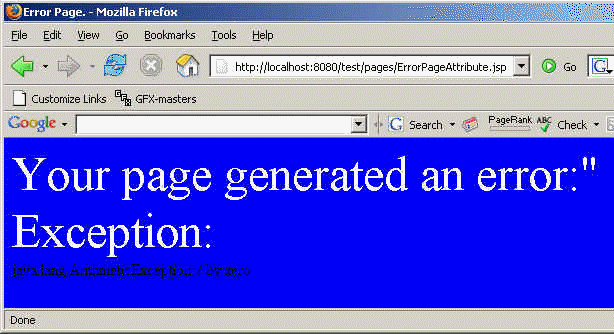
This page shows the error generated in the calling JSP page because of dividing the entered number by zero or any type of the error when the value of the isErrorPage attribute is set with the true value.

About the error1.jsp page:

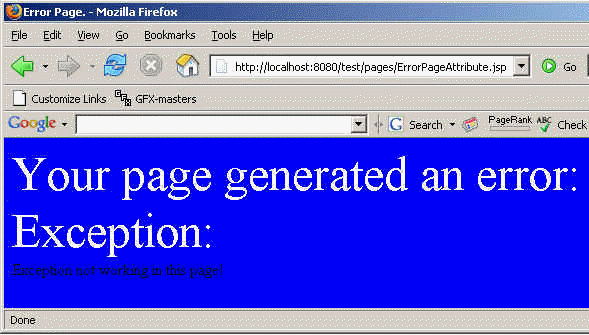
There is only one difference between the JSP page error.jsp and the error1.jsp page is the value of the isErrorPage attribute of the page directive. In this page the value of the attribute is false. Because of this, the page does not support the exception object and will generate an error.

Here is the code of the ErrorPageAttribute.jsp page:

<%@page errorPage="error1.jsp" %>
<html>
	<head><title>Showing Error Page.</title></head>
	<body>
		<form method="post">
			<table border="0" cellspacing="0" cellpadding="0">
				<tr>
					<td>Enter a number: </td>
					<td><input type="text" name="txtNum" />
				</tr>
				<tr>
					<td>&nbsp;</td>
					<td><input type="submit" name="B1" value="Divide by zero" />
				</tr>
			</table>
		</form>
		<%
			if(request.getParameter("txtNum") != null){
				if(!request.getParameter("txtNum").equals("")){
int div = Integer.parse
Int(request.getParameter("txtNum")) / 0;
out.println("Answer is: " + div); } else{
out.println("<html><font color=r
ed>Please enter a number.</font></html>");
} } %> </body> </html>

Output for the ErrorPageAttribute.jsp page:
Here is the code of the error.jsp page:

<%@page isErrorPage="true" %>
<html>
	<head><title>Error Page.</title></head>
	<body bgcolor="blue">
		<font size="16" color="white">Your page generated an error:"<br/>
		Exception:<br/></font>
		<%= exception.toString() %>
	</body>
</html>

Output for the error.jsp page:
Here is the code of the error1.jsp page:

<%@page isErrorPage="false" %>
<html>
	<head><title>Error Page.</title></head>
	<body bgcolor="blue">
		<font size="16" color="white">Your page generated an error:"<br/>
		Exception:<br/></font>
		Exception not working in this page!
	</body>
</html>

Output for the error1.jsp page:
Download the ErrorPageAttribute.jsp page.

Download the error.jsp page.

Download the error1.jsp page.


» View all related tutorials
Related Tags: c string stl io sed arguments type jstl boolean tag return ole this oo check js if boo ie with

Leave your comment:

Name:

Email:

URL:

Title:

Comments:


Enter Code:

Audio Version
Reload Image
 

Note: Emails will not be visible or used in any way, and are not required. Please keep comments relevant. Any content deemed inappropriate or offensive may be edited and/or deleted.

No HTML code is allowed. Line breaks will be converted automatically. URLs will be auto-linked. Please use BBCode to format your text.

Add This Tutorial To:
  Del.icio.us   Digg   Google   Spurl   Blink   Furl   Simpy   Y! MyWeb 

Current Comments

4 comments so far (
post your own) View All Comments Latest 10 Comments:

Hi Sir which kind of information U needed u can call me direct..... Hope u wll understand... he he he he he....

Posted by Avanish Pandey on Friday, 12.7.07 @ 17:22pm | #41547

Hi Sir which kind of information U needed u can call me direct..... Hope u wll understand... he he he he he....

Posted by Avanish Pandey on Friday, 12.7.07 @ 17:20pm | #41546

Hi,
This is Pankaj Jha working @ Patni, This is a good article to understand but you can help more to show web.xml entry.

Thanks,
Pankaj

Posted by Pankaj on Monday, 04.30.07 @ 11:11am | #15076

Hi this is vijay working in CAPGEMINI...Mumbai....
I am working in JAVA platform.....

This is good article easily understood by any one....

Really good...Keep it up....

Posted by vijayakrishna.seemakurti on Sunday, 04.22.07 @ 00:02am | #14703

Training Courses
Tell A Friend
Your Friend Name
Website Designing Services
 
Web Designing Packages From $150!
 
Website Designing Company Web Hosting
 
Website Designing Quotation
 
Search Tutorials:


Home | JSP | EJB | JDBC | Java Servlets | WAP  | Free JSP Hosting  | Search Engine | News Archive | Jboss 3.0 tutorial | Free Linux CD's | Forum | Blogs

About Us | Advertising On RoseIndia.net  | Site Map

India News

Indian Software Development Company | iPhone Development Company in India | Flex Development Company in India | Java Training Delhi | Java Training at Noida |

Send your comments, Suggestions or Queries regarding this site at roseindia_net@yahoo.com.

Copyright © 2008. All rights reserved.