How to Make a Pdf and inserting data


In this tutorial you will learn how we can make a pdf file and how we can insert a data into the pdf file. This all be done by using the jsp.
To make this program firstly we need to import java.io.* package which will help us to use input output in our program. The other packages which we need to import are com.lowagie.text.* and com.lowagie.text.pdf.* package which will help us to make a pdf file.
The logic of the program will be written inside the scriptlet. Firstly make a object of class Document. The Document describes a document's page size, margins, and other important attributes. It works as a container for a document's chapters, sections, images, paragraphs, and other content. Now use a method getContentType() of the request object which returns the content type.
If the contentType is not null and indexOf("multipart/form-data")>=0), then make a object of DataInputStream and pass InputStream object in the constructor of DataInputStream class. To get the length of the content use the method getContentLength() of the request object. Now declare a byte array and pass the content length in the array.
Use while loop to convert the uploaded file into the byte code. To convert the byte code into the String make a object of class String class and pass it in the constructor of the class String. To save the file name we need to substring the file object. After making the substring of the string we need to extract the index of file. Upto now we have got the file name and the index of file, to get the last index use the method lastIndexOf().
Now create a document writer that writes the equivalent syntax for a document's content to a specific OutputStream. PdfWriter.getInstance() creates a PDF document writer that writes PDF syntax to concerned file by a FileOutputStream.
Now open the document by document.open(). After that add the content to the document. Create a Paragraph that houses a paragraph of text, tells the PDF document writer to ensure that the Paragraph's text is justified on both sides and adds the Paragraph to the previously created Document. At last closes the document by using the document.close(). The closing of the document is important because it flushes and closes the OutputStream instance.
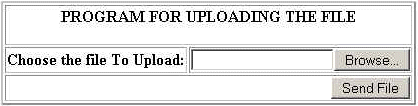
The code of the indexUploadPDF.jsp file:
| <%@ page language="java" %> <HTML> <HEAD><TITLE>Display file upload form to the user</TITLE></HEAD> <% // for uploading the file we used Encrypt type of multipart/form-data and input of file type to browse and submit the file %> <BODY> <FORM ENCTYPE="multipart/form-data" ACTION="UploadPDF.jsp" METHOD=POST> <br><br><br> <center><table border="2" > <tr><center><td colspan="2"><p align="center"><B>PROGRAM FOR UPLOADING THE FILE</B><center></td></tr> <tr><td><b>Choose the file To Upload:</b></td> <td><INPUT NAME="F1" TYPE="file"></td></tr> <tr><td colspan="2"><p align="right"><INPUT TYPE="submit" VALUE="Send File" ></p></td></tr> <table> </center> </FORM> </BODY> </HTML> |
Here is the code of the UploadPDF.jsp file.
| <%@ page import="java.io.*, com.lowagie.text.*,com.lowagie.text.pdf.*" %> <% //response.setContentType( "application/pdf" ); Document document = new Document(); String contentType = request.getContentType(); if ((contentType != null) && (contentType.indexOf("multipart/form-data") >= 0)) { DataInputStream in = new DataInputStream(request.getInputStream()); String record = null; String record1 = null; int formDataLength = request.getContentLength(); byte dataBytes[] = new byte[formDataLength]; int byteRead = 0; int totalBytesRead = 0; while (totalBytesRead < formDataLength) { byteRead = in.read(dataBytes, totalBytesRead, formDataLength); totalBytesRead += byteRead; } String file = new String(dataBytes); String saveFile = file.substring(file.indexOf("filename=\"") + 10); saveFile = saveFile.substring(0, saveFile.indexOf("\n")); saveFile = saveFile.substring(saveFile.lastIndexOf("\\") + 1,saveFile.indexOf(".")); int lastIndex = contentType.lastIndexOf("="); String boundary = contentType.substring(lastIndex + 1,contentType.length()); int pos; pos = file.indexOf("filename=\""); pos = file.indexOf("\n", pos) + 1; pos = file.indexOf("\n", pos) + 1; pos = file.indexOf("\n", pos) + 1; int boundaryLocation = file.indexOf(boundary, pos) - 4; int startPos = ((file.substring(0, pos)).getBytes()).length; int endPos = ((file.substring(0, boundaryLocation)).getBytes()).length; PdfWriter.getInstance( document, new FileOutputStream (config.getServletContext().getRealPath("/")+"uploadedFiles/"+saveFile+".pdf")); document.open(); document.add(new Paragraph(file)); document.close(); %> <Center> <table border="2"> <tr> <td><b>You have successfully upload at</b> </td></tr></table> <a href=<%=(config.getServletContext().getRealPath("/")+"uploadedFiles/"+saveFile+".pdf") %>><%=saveFile+".pdf" %></a> </center> <% } %> |
The output of the program is given below: