Home Jsf Richfaces Running the application


Running the application
Posted on: June 24, 2008 at 12:00 AM
If you have completed previous steps of the application, this is the last step to see this application running on the browser.

Running the Application


If you have completed previous steps of the application, this is the last step to see this application running on the browser. Just follow the steps:

  1. Start Tomcat Server
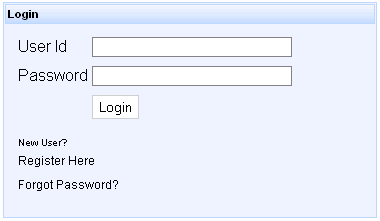
  2. Type "http://localhost:8080/RichLRApplication/user/login.jsf" to the address bar of the browser
  3. Submit the above URL or hit enter key of the keyboard.

You will see the following figure on the browser:
Related Tags for Running the application:
ccombrowserapplicationiovithisapprowifrowstowserunastwselastepslicompletebrowseinasmpscaletrunningstepppcatseeatishamplpressthstepsavstatiapicaicapleplpronomo


More Tutorials from this section

Ask Questions?    Discuss: Running the application   View All Comments

Post your Comment


Your Name (*) :
Your Email :
Subject (*):
Your Comment (*):
  Reload Image


Ask Questions?

If you are facing any programming issue, such as compilation errors or not able to find the code you are looking for.

Ask your questions, our development team will try to give answers to your questions.