
JPA read data from database example


In this section, you will learn how to retrieve data from database using JPA. Create a "JPARead.java" file and follows the following steps to reading data from database.
Create "JPARead" class file.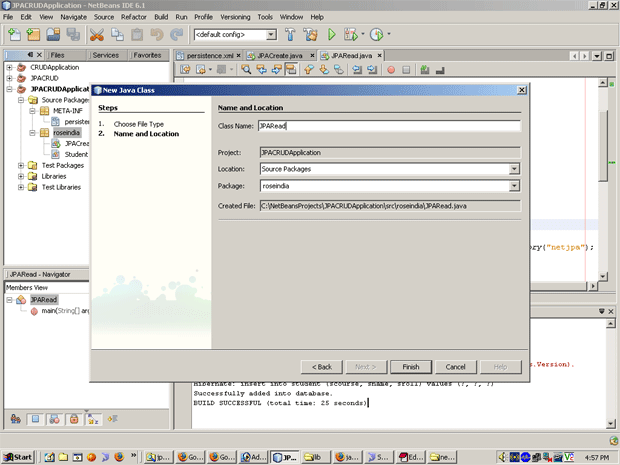
Put the following text in "JPARead.java" file.

JPARead.java
/*
* To change this template, choose Tools | Templates
* and open the template in the editor.
*/

package roseindia;

import java.util.Iterator;
import java.util.List;
import javax.persistence.EntityManager;
import javax.persistence.EntityManagerFactory;
import javax.persistence.EntityTransaction;
import javax.persistence.Persistence;
import javax.persistence.Query;

/**
*
* @author Administrator
*/
public class JPARead {
public static void main(String arg[]){
EntityManagerFactory emf=Persistence.createEntityManagerFactory("netjpa");
EntityManager em=emf.createEntityManager();
try{
EntityTransaction entr=em.getTransaction();
entr.begin();
Query query=em.createNamedQuery("readAllRecords");
List stList=query.getResultList();
Iterator stIterator=stList.iterator();
while(stIterator.hasNext()){
Student stu=(Student)stIterator.next();
System.out.print("Name:"+stu.getSname());
System.out.print(" Roll:"+stu.getSroll());
System.out.print(" Course:"+stu.getScourse());
System.out.println();
}
entr.commit();
}
catch(Exception e){
System.out.println(e.getMessage());
}
finally{
em.close();
}
}
}
Run it and get the following output:
