Core Java| JSP| Servlets| XML| EJB| JEE5| Web Services| J2ME| Glossary| Questions?


Search Tutorials:
 

Software Solutions and Services


  JDO Tutorials
  EAI Articles
  Struts Tutorials
  Java Tutorials
  Java Certification
  Java Applet
Questions
Comments
 
Flex Custom mxml tags example 
 

MXML files which functionalities are extended in to other mxml files are called Custom MXML components.


Flex custom mxml tags example


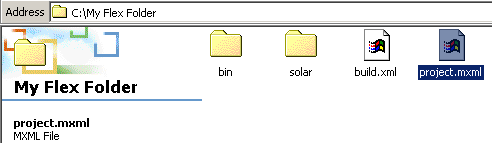
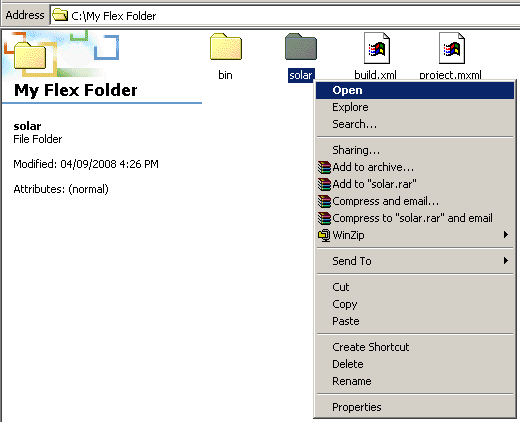
Flex .mxml files, whose functionalities are extended in to other Flex .mxml files are called custom mxml components. Custom mxml components are also referred to as custom mxml tags in the flex .mxml files in which their functionality is imported. Here, power.mxml is the custom mxml component whose functionality is been imported and used in the project.mxml file. Now in the base directory of  project.mxmli.e., C:\My Flex Folder, a folder solar is created and inside it the power.mxml file is placed. Now the complete folder path of power.mxml, i.e., solar.*  is put in to the MyComps names space. This MyComps  names space is used inside the project.mxml file to utilize the functionality of power.mxml file.

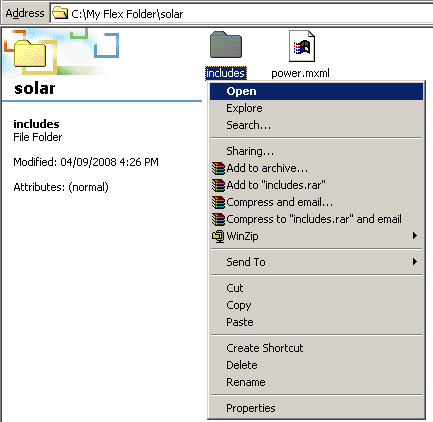
Now inside the <mx:Script > tags of power.mxml file, an include statement calls an action script file event.as. This action script file contains two functions with names Trinity and Neo respectively. Here, Neo is the event handler function. These functions are invoked  through the open and change attributes of flex combo box control. 

project.mxml

<?xml version="1.0"?>

<mx:Application xmlns:mx="http://www.adobe.com/2006/mxml
    xmlns:MyComps = 
'solar.*' backgroundColor = '#CCFFFC'>

<MyComps:power/>

</mx:Application>

basedirectory


power.mxml

<?xml version = '1.0' encoding = 'utf-8'?>
<mx:Box xmlns:mx = 'http://www.adobe.com/2006/mxml'>

  <mx:Script>
    include 'includes/event.as';
  </mx:Script>

  <mx:HBox>
    <mx:ComboBox open = 'Trinity()' change = 'Neo(event)'>
      <mx:String> Morpheus</mx:String>
      <mx:String> Jonathan</mx:String> 
      <mx:String> Nancy</mx:String> 
    </mx:ComboBox>
    <mx:TextArea id = 'crown' color = 'green'/>
  </mx:HBox>

</mx:Box>


event.as

public function Trinity():void{
crown.text = ''; 
}

public function Neo(eve:Event):void{
crown.text = 'Value : ' + eve.currentTarget.value + '\n' 
'Index : ' + eve.currentTarget.selectedIndex;
}

project.swf


Download the code


» View all related tutorials
Related Tags: c gui com class controls ui select button style control io components sed implementation component definition tag name using this

Leave your comment:

Name:

Email:

URL:

Title:

Comments:


Enter Code:

Audio Version
Reload Image
 

Note: Emails will not be visible or used in any way, and are not required. Please keep comments relevant. Any content deemed inappropriate or offensive may be edited and/or deleted.

No HTML code is allowed. Line breaks will be converted automatically. URLs will be auto-linked. Please use BBCode to format your text.

Add This Tutorial To:
  Del.icio.us   Digg   Google   Spurl   Blink   Furl   Simpy   Y! MyWeb 
Training Courses
Tell A Friend
Your Friend Name
Website Designing Services
 
Web Designing Packages From $150!
 
Website Designing Company Web Hosting
 
Website Designing Quotation
 
Search Tutorials:


Home | JSP | EJB | JDBC | Java Servlets | WAP  | Free JSP Hosting  | Search Engine | News Archive | Jboss 3.0 tutorial | Free Linux CD's | Forum | Blogs

About Us | Advertising On RoseIndia.net  | Site Map

India News

Indian Software Development Company | iPhone Development Company in India | Flex Development Company in India | Java Training Delhi | Java Training at Noida |

Send your comments, Suggestions or Queries regarding this site at roseindia_net@yahoo.com.

Copyright © 2008. All rights reserved.