Login.mxml


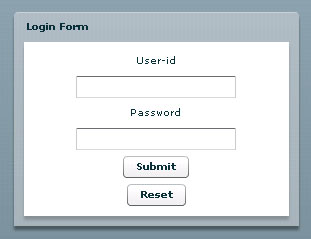
This is a small example of Login screen in flex, we assume that the userid should be roseindia and password is abc, if someone enter wrong id or password or just hit the submit button, an alert message will be displayed, if both the userid and password would correct then an welcome message in alert box will be displayed.
In this example you will have different mxml file and action script file.
<?xml version="1.0" encoding="utf-8"?>
<mx:Application xmlns:mx="http://www.adobe.com/2006/mxml" layout="absolute">
<mx:Script source="Login.as"/>
<mx:Panel id="NewForm" title="Login Form" height="214" width="285" horizontalAlign="center" verticalAlign="middle" horizontalCenter="23" verticalCenter="2">
<mx:Label id="userid" text="User-id"/>
<mx:TextInput id="user" />
<mx:Label id="password" text="Password"/>
<mx:TextInput id="pass" displayAsPassword="true"/>
<mx:Button id="submit" label="Submit" click="log()"/>
<mx:Button label="Reset" labelPlacement="right" id="Reset" click="clear()"/>
</mx:Panel>
</mx:Application> |
Login.as
import mx.controls.Alert;
public var u:String;
public var p:String;
public function log():void
{
u=user.text.toLowerCase();
p=pass.text.toLowerCase();
if((u==''||u!='roseindia')||(p==''||p!='abc'))
{
Alert.show('Wrong userid or Password','Sorry',Alert.OK | Alert.CANCEL);
}
else
{
Alert.show('Hi','Welcome',mx.controls.Alert.OK);
}
}
public function clear():void
{
user.text='';
pass.text='';
}
|