Explore key & mouse with Flex


On this web page you will to know how to determine for
a key is pressed or not when an event occurs. In the example below two flex
controls CheckBox and Button and two flex containers HBox and VBox
created. Also two MouseEvent class events click and mouse over are
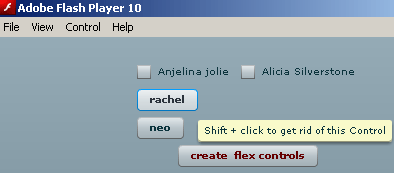
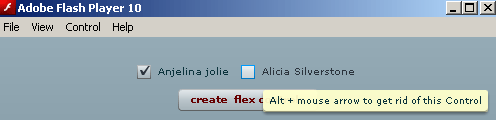
used. Example below is coded to track the pressing of two keys shift and alt
with define events CLICK and MOUSE_OVER respectively.
Function addChild in the code is used to bring the flex controls to
generate inside the flex containers.
Function addEventListener is used to add or invoke the respective mouse
events on the containers.
Syntax for using above functions:
container_id.addChild(control_id);
control_id.addEventListener(MouseEvent.CLICK/MOUSE_OVER,
a_function_name);
Amanda.mxml
<?xml version = '1.0'?>

<mx:Application

  xmlns:mx = 'http://www.adobe.com/2006/mxml'

>


<mx:Script>

  import mx.controls.Button;

  import mx.controls.CheckBox;


  public function createControls():void{


  var ch0:CheckBox = new CheckBox();

  ch0.label = 'Anjelina jolie'


  var ch1:CheckBox = new CheckBox();

  ch1.label = 'Alicia Silverstone'


ch0.addEventListener(MouseEvent.MOUSE_OVER, removeCheckBoxes);

ch1.addEventListener(MouseEvent.MOUSE_OVER, removeCheckBoxes);


  horizonBox.addChild(ch0);

  horizonBox.addChild(ch1);


  var bt0:Button = new Button();

  bt0.label = 'rachel';

  var bt1:Button = new Button();

  bt1.label = 'neo';


bt0.addEventListener(MouseEvent.CLICK, removeButtons);

bt1.addEventListener(MouseEvent.CLICK, removeButtons);


  vertical.addChild(bt0);

  vertical.addChild(bt1);


  }


  public function removeCheckBoxes(event:MouseEvent):void{

  if(event.altKey)

  horizonBox.removeChild(CheckBox(event.currentTarget));

  else

  event.currentTarget.toolTip = 'Alt + mouse'

  + ' arrow to get rid of this Control';

  }


  public function removeButtons(event:MouseEvent):void{

  if(event.shiftKey)

  vertical.removeChild(Button(event.currentTarget));

  else

  event.currentTarget.toolTip = 'Shift + click to'

  + ' get rid of this Control';

  }


</mx:Script>


  <mx:VBox id = 'vertical' >

  <mx:HBox id = 'horizonBox'/>


  </mx:VBox>


  <mx:Button

  label = 'create  flex controls'

  click = 'createControls()'

  color = '#660000'

  />


</mx:Application>
|
Amanda.swf

Download the code

