
JSF Installation on Tomcat


Complete Java Server Faces (JSF) Tutorial - JSF Tutorials. JSF Tutorials at Rose India covers everything you need to know about JSF.
In this tutorial we will explain you how to install JSF 1.2 on tomcat server. We will develop small web application to test our integrated environment.
As stated in the last section, JSF 1.2 requires servler 2.5 and jsp 2.1 complaint container. So, to install and test JSF 1.2 we will use Tomcat 6.0 which is JSF 1.2 complaint container. We will download Tomcat 6.0, JSTL, and JSF 1.2, and then explain you the steps involved in integrating these stuffs.
Download JSF
The reference implementation of JSF 1.2 can be download from from https://javaserverfaces.dev.java.net/ . For this tutorial we have downloaded jsf-1.2_04-b10-p01.zip. Save the downloaded file into any directory of your choice and then unzip it.
Download Tomcat
The latest version of tomcat can be downloaded from http://tomcat.apache.org/download-60.cgi. We have downloaded tomcat apache-tomcat-6.0.13.zip for developing and testing the application. Unzip the downloaded file and then copy the "apache-tomcat-6.0.13" folder to directory from where you want to run the server. Here I am assuming that you have latest version of JDK ( JDK 5 or higher) and you are to use it from command prompt. To test Tomcat 6.0, go to the server directory "apache-tomcat-6.0.13/bin" and then double click on the startup.bat file. Then open the browser and type http://localhost:8080, your browser should display the tomcat server home page.
Downloading JSL Library
You can download the latest version of JSTL from http://people.apache.org/builds/jakarta-taglibs/nightly/. For this tutorial we have downloaded jakarta-taglibs-20060824.zip.
Creating blank web application
Now we are ready to create our integrated application. Please follow the follow steps:
- Creating Web application
Create a directory "jsf12" under "apache-tomcat-6.0.13\webapps".
- Create WEB-INF directory under "apache-tomcat-6.0.13\webapps\jsf12".
- Create classes and lib directories under "apache-tomcat-6.0.13\webapps\jsf12\WEB-INF".
- Create file web.xml under "apache-tomcat-6.0.13\webapps\jsf12\WEB-INF"
with the following content:
In the above file we have defined the "Faces Servlet" and then mapped all the requests "*.jsf" to it.<?xml version='1.0' encoding='UTF-8'?>
<!DOCTYPE web-app PUBLIC
"-//Sun Microsystems, Inc.//DTD Web Application 2.3//EN"
"http://java.sun.com/dtd/web-app_2_3.dtd">
<web-app>
<!-- Faces Servlet -->
<servlet>
<servlet-name>Faces Servlet</servlet-name>
<servlet-class>javax.faces.webapp.FacesServlet</servlet-class>
<load-on-startup> 1 </load-on-startup>
</servlet>
<!-- Faces Servlet Mapping -->
<servlet-mapping>
<servlet-name>Faces Servlet</servlet-name>
<url-pattern>*.jsf</url-pattern>
</servlet-mapping>
</web-app>
- Create file faces-config.xml under "apache-tomcat-6.0.13\webapps\jsf12\WEB-INF"
with the following content:
<?xml version='1.0' encoding='UTF-8'?>
<!DOCTYPE faces-config PUBLIC
"-//Sun Microsystems, Inc.//DTD JavaServer Faces Config 1.1//EN"
"http://java.sun.com/dtd/web-facesconfig_1_1.dtd">
<faces-config>
</faces-config>
In the next sections we will learn how to use faces-config.xml.
Copying JSF 1.2 library: Copy jsf-api.jar and jsf-impl.jar from "jsf-1.2_04-b10-p01\jsf-1.2_04-b10-p01\lib" into "apache-tomcat-6.0.13\webapps\jsf12\WEB-INF\lib" directory.
-
Copying JSTL library: Copy standard.jar
and jstl.jar from "\jakarta-taglibs-20060824\jakarta-taglibs\standard-1.0\lib"
into "apache-tomcat-6.0.13\webapps\jsf12\WEB-INF\lib"
directory.
-
Creating JSP files:
Create index.jsp file into "apache-tomcat-6.0.13\webapps\jsf12\" directory and paste the following content in the file:
<jsp:forward page="hello.jsf"/> index.jsp file simply forwards the request to hello.jsf.
create hello.jsf in the same directory within following content:<!DOCTYPE HTML PUBLIC "-//W3C//DTD HTML 4.01 Transitional//EN">
<%@taglib uri="http://java.sun.com/jsf/html" prefix="h"%>
<%@taglib uri="http://java.sun.com/jsf/core" prefix="f"%>
<html>
<body>
<f:view>
<h:outputText value="Hello, Welcome to JSF 1.2 World!"/>
</f:view>
</body>
</html>The tag <h:outputText value="Hello, Welcome to JSF 1.2 World!"/> generates "Hello, Welcome to JSF 1.2 World!" on the browser. In the next section we will learn these tags in detail.
Now we have completed the integration steps and ready to test the application.
Testing the application
To test application run tomcat and then type http://localhost:8080/jsf12/ in the browser. You browser should display "Hello, Welcome to JSF 1.2 World!" message. Here is the screen shot of the output:
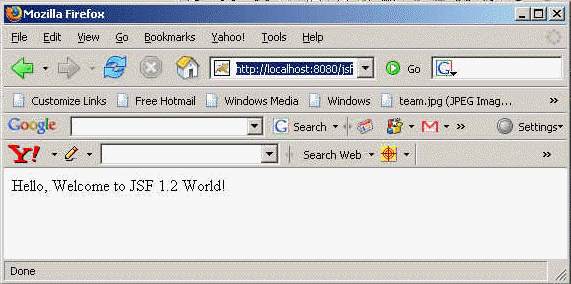
Congratulations you have successfully installed JSF 1.2 on tomcat 6.0 server.
