Uploading Single File by Using JSP


This tutorial will help you to understand how you can upload a file by using the Jsp. As Jsp is mainly used for the presentation logic, we should avoid to write a code in the jsp page, but at least we should know how we can use a java code inside the jsp page. In Jsp the logic of the program or Java code is mainly written inside the scriptlet. In this example we are going to tell you how can make use of scriptlet to upload a file.
In this example we are going to tell you how we can upload a single file by using Jsp and how it will get stored on a particular memory area. To get the desired result firstly we need to need to make a jsp page which will work as a controller, and to fulfill our requirements we need to import some packages, classes and interfaces. For this program we are using one package java.io.* which provides us classes and interfaces for java input/output.
The logic of the program will be written inside the scriptlet. The scriptlet tag is mostly used for writing the java code inside the jsp.
In the scriptlet we have used the method getContentType( ) of the implicit object request. This method is used to get the content type information from the Jsp header. The next step we are going to do is to check the condition whether the content type is not equal to Null and as well as the passed data from mulitpart/form-data is greater than or equal to 0. If the condition is true make a object of DataInputStream. Inside the constructor of the DataInputStream pass the getInputStream() method of the implicit object request reference of the class InputStream. It will create a DataInputStream that uses the specified underlying InputStream. A data input stream read primitive Java data types from an underlying input stream.
Now we need to get the length of the content type which will be passed as a parameter to the constructor of the byte array. Now declare two int variables and initialize their values as 0. To convert the uploaded file into the byte code use the while loop. Now pass the array of dataBytes in the constructor of String class and store it in the variable file. To save the file name we need to substring the file object. After making the substring of the string we need to extract the index of file. Upto now we have got the file name and the index of file, now what we need is create an new file with the same name and writing the content in new file. For this we will make a object of class File and pass a new directory name which we want to make as a parameter in the constructor of the File class. By using the File object method mkdir() we will make a directory. To write the content in new file make a object of class FileOutputStream.
We need another jsp page which will be used for the presentation. This jsp page contains the information where the request will be sent whenever it will get a request for file uploading. To upload the file to the jsp page firstly we need to browse the files and get the appropriate file. This will be achieved by the input type "file". To save the file to the particular location we need a submit button.
In this program firstly you will get a jsp page which will have the option of browse and Send File. The logic behind it will be controlled by the controller.
Here is the code of the index_single_upload.jsp:
<%@ page language="java" %>
<HTml>
<HEAD><TITLE>Display file upload form to the user</TITLE></HEAD>
<% //  for uploading the file we used Encrypt type of multipart/
form-data and input of file type to browse and submit the file %>
  <BODY> <FORM  ENCTYPE="multipart/form-data" ACTION=
"sinle_upload_page.jsp" METHOD=POST>
		<br><br><br>
	  <center><table border="2" >
                    <tr><center><td colspan="2"><p align=
"center"><B>PROGRAM FOR UPLOADING THE FILE</B><center></td></tr>
                    <tr><td><b>Choose the file To Upload:</b>
</td>
                    <td><INPUT NAME="F1" TYPE="file"></td></tr>
					<tr><td colspan="2">
<p align="right"><INPUT TYPE="submit" VALUE="Send File" ></p></td></tr>
             <table>
     </center>
     </FORM>
</BODY>
</HTML>
Output for the index_single_upload.jsp

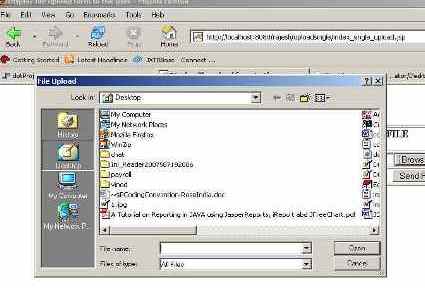
Output After Clicking Browse Button:
Here is the code of the single_upload_page.jsp:
<%@ page import="java.io.*" %>
<%
	//to get the content type information from JSP Request Header
	String contentType = request.getContentType();
	//here we are checking the content type is not equal to Null and
 as well as the passed data from mulitpart/form-data is greater than or
 equal to 0
	if ((contentType != null) && (contentType.indexOf("multipart/
form-data") >= 0)) {
 		DataInputStream in = new DataInputStream(request.
getInputStream());
		//we are taking the length of Content type data
		int formDataLength = request.getContentLength();
		byte dataBytes[] = new byte[formDataLength];
		int byteRead = 0;
		int totalBytesRead = 0;
		//this loop converting the uploaded file into byte code
		while (totalBytesRead < formDataLength) {
			byteRead = in.read(dataBytes, totalBytesRead,
formDataLength);
			totalBytesRead += byteRead;
			}
					String file = new String(dataBytes);
		//for saving the file name
		String saveFile = file.substring(file.indexOf("filename=\
"") + 10);
		saveFile = saveFile.substring(0, saveFile.indexOf("\n"));
		saveFile = saveFile.substring(saveFile.lastIndexOf("\\")
 + 1,saveFile.indexOf("\""));
		int lastIndex = contentType.lastIndexOf("=");
		String boundary = contentType.substring(lastIndex + 1,
contentType.length());
		int pos;
		//extracting the index of file
		pos = file.indexOf("filename=\"");
		pos = file.indexOf("\n", pos) + 1;
		pos = file.indexOf("\n", pos) + 1;
		pos = file.indexOf("\n", pos) + 1;
		int boundaryLocation = file.indexOf(boundary, pos) - 4;
		int startPos = ((file.substring(0, pos)).getBytes()).length;
		int endPos = ((file.substring(0, boundaryLocation))
.getBytes()).length;
		// creating a new file with the same name and writing the
content in new file
		FileOutputStream fileOut = new FileOutputStream(saveFile);
		fileOut.write(dataBytes, startPos, (endPos - startPos));
		fileOut.flush();
		fileOut.close();
				%><Br><table border="2"><tr><td><b>You have successfully
 upload the file by the name of:</b>
		<% out.println(saveFile); %></td></tr></table> <%
		}
%>
Output for Sinle_upload_page.jsp

