
Interaction Helpers: toggle( ) and hover( )


Interaction Helpers: toggle( ) and hover( )
.toggle( )
This method binds two or more handlers to the matched elements, which will be executed on alternate clicks.
Example :
jqTogglePara.html
<!DOCTYPE html>
<html>
<head>
  <script src="jquery-1.4.2.js"></script>
</head>
<body>
	<button>Toggle</button>
<p>Bye</p>
<p style="display: none">Good Night</p>
<script>

$("button").click(function () {
$("p").toggle();
});
</script>
</body>
</html>
|
Output :
When page opens :
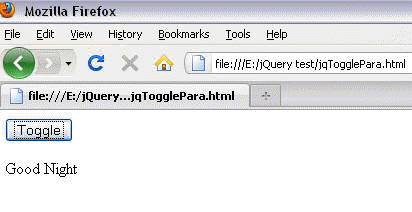
When we click on button :

Description of the program :
You can see that there are two paragraph . We set toggle to 'p', it means when we click on button the paragraph changes alternately :
$('p').toggle();
.hover( )
This method binds two handlers to the matched elements, to be executed when the mouse pointer enters and leaves the elements.
Example :
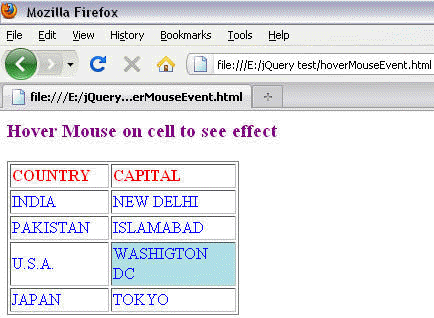
n this example, a table is given, when we hover mouse on it , it will highlight the cell by changing background of the cell.
hoverMouseEvent.html
| <html> <head> <meta http-equiv="Content-Language" content="en-us"> <style type="text/css"> .style1 { border-style: solid; border-width: 1px; } .style2 { color: #0000FF; } td.hover { background:#B0E0E6; } .style3 { color: #FF0000; } </style> <script src="jquery-1.4.2.js"></script> </head> <body> <h3><font color="purple"> Hover Mouse on cell to see effect </font></h3> <table style="width: 23%" class="style1" border="1"> <tr> <td style="width: 157px" class="style3"><strong> COUNTRY </strong></td> <td style="width: 217px" class="style3"><strong> CAPITAL </strong></td> </tr> <tr> <td style="width: 157px" class="style2"> INDIA</td> <td style="width: 217px" class="style2"> NEW DELHI</td> </tr> <tr> <td style="width: 157px" class="style2"> PAKISTAN</td> <td style="width: 217px" class="style2"> ISLAMABAD</td> </tr> <tr> <td style="width: 157px" class="style2"> U.S.A.</td> <td style="width: 217px" class="style2"> </tr> <tr> <td style="width: 157px" class="style2"> JAPAN</td> <td style="width: 217px" class="style2"> TOKYO</td> </tr> </table> <script> $("td").hover( function () { $(this).addClass("hover"); }, function () { $(this).removeClass("hover"); } ); </script> </body> </html> |
Output :
When you hover mouse on any of the cell, it get highlighted :
Learn from experts! Attend jQuery Training classes.
